What is OOP?
OOP stands for Object-Oriented Programming
Recall Procedural Programming from CCPROG1&2:
Procedural programming focuses on writing step-by-step instructions or functions to manipulate data
OOP on the other hand, focuses on building self-contained “objects” that bundle both the data and the functions together.
Benefits of OOP
Section titled “Benefits of OOP”- OOP provides a clear structure for the programs.
- OOP helps to keep the Java code DRY “Don’t Repeat Yourself”, and makes the code easier to maintain, modify and debug.
- OOP makes it possible to create full reusable applications with less code and shorter development time.
Tech Tip: Never write the same piece of code twice! If you find yourself copying and pasting the same lines of code in different parts of your program, you are breaking the DRY principle.
Key Intution
Section titled “Key Intution”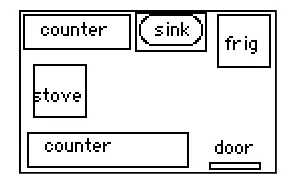
Think of an OOP program like a kitchen layout.
- Programs are a collection of smaller individual “objects” working together similar to how a kitchen layout consists of individual appliances and equipment.
- Objects are essentially simplified real-world things. In code, an “object” is just a simplified, digital version of a real-world thing and contains only details the program cares about.
However, kitchen layouts are static (the objects just sit there). Computer programs are dynamic, meaning the objects actually act and react with each other.
- Objects act like people, to make things happen, objects “talk” to each other the same way humans do. If you want salt at dinner, you ask someone, “Pass the salt,” and they do it.
- In a program, If a Chef object needs ingredients, it “asks” the Refrigerator object, “Give me three eggs,” and the refrigerator complies (again, acts like a human!).
Another example is when you bake a cake in that kitchen program:
The Oven object tells the Timer object to count down, and the Recipe object tells the Ingredient object to lower its quantity. Just like you now have a finished cake and three fewer eggs in real life, the digital kitchen objects in the program have permanently changed their states (timer set to 0 and ingredients minus 3!).
We will learn more about objects, the key building blocks of OOP in the next page!